
Affiliate Back Office Overview
HOW-TO GUIDE
How to Use Your Affiliate URL in Advertisements
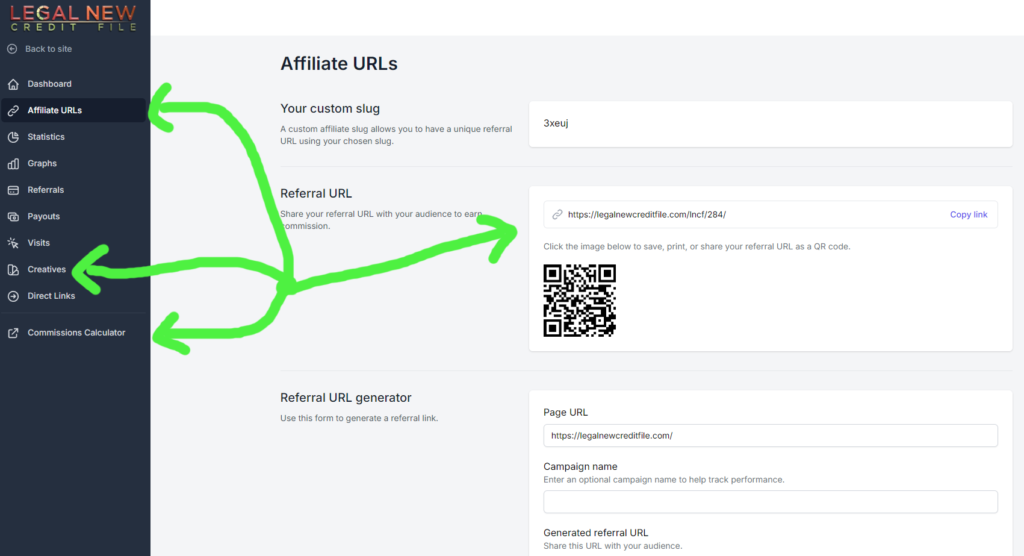
When you advertise our creatives, your own affiliate URL will automatically be generated under the “Affiliate URLs” section on your dashboard. Please disregard the link shown in any example images, as it belongs to a different user.
Example: Facebook Ads
If you’re running a Facebook ad for traffic, it’s important to know that many of our creatives achieve traffic cost clicks around $0.25 per click for users aged 25 to 65 in the United States.
Steps for Using Your Affiliate URL in Facebook Ads:
Copy Your Affiliate URL:
- Log in to your affiliate dashboard.
- Navigate to the “Affiliate URLs” section and copy your unique referral URL.
Set Up Your Facebook Ad:
- When prompted by Facebook for the URL to which you want to redirect users, paste your affiliate URL that you copied from your dashboard.
By doing this, when a sale is made through your ad, you will receive credit for your traffic. You will also be notified whenever someone registers and makes a payment automatically.
Track Your Performance
In your affiliate dashboard, you can monitor your statistics, including traffic visits, registrations, and sales as they come in. This information helps you understand the effectiveness of your advertising efforts.
How to Use Our Affiliate Program Continued
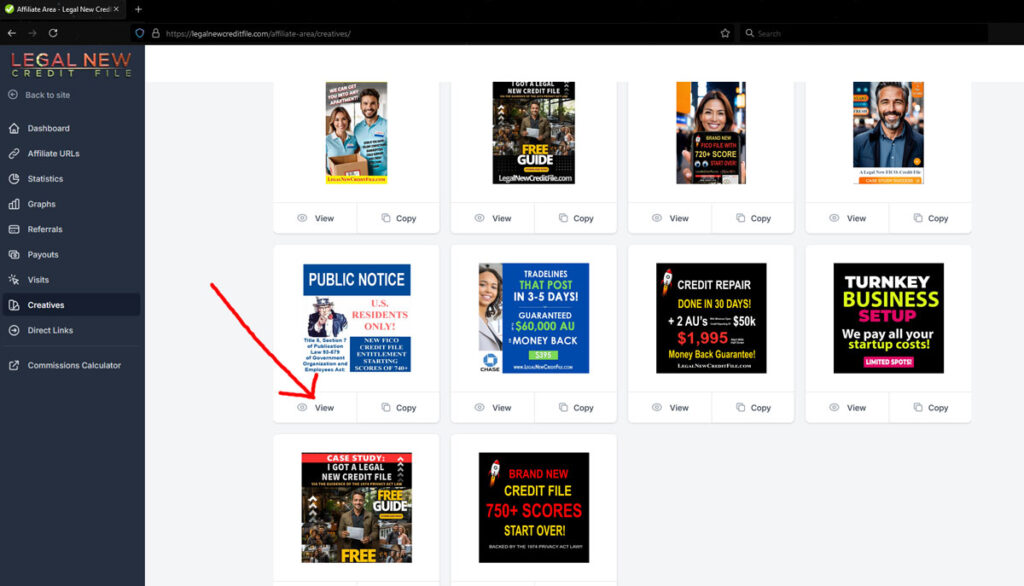
When you click on “VIEW” (as shown in the image above), the post/image description will pop up. You can easily copy and paste this description into your social posts, along with images that you can right-click and save.
Our Growing Affiliate Program
We’re excited to share that our affiliate program is new and continuously expanding! We regularly add fresh images, videos, and other creatives for you to share. We’re dedicated to equipping you with the best tools to maximize your success.
If you have specific content you’d like to share on your website or social media that would resonate with your audience, please let us know. We’re here to support you in any way we can.
Explore Our Social Media
Feel free to explore our social media accounts, where you can download and save any content you find. Don’t forget to add your affiliate links to ensure you receive credit for your shares!
- YouTube: Credit Privacy News
- Facebook: Start My Business Credit
- TikTok: Legal New Credit File
(These links can also be found in the footer of our website.)
How to Add Your Unique Affiliate Link
Here’s a quick guide on how to incorporate your unique affiliate link into any videos, images, or creatives you find on our social media or in the “Creatives” tab of your affiliate dashboard. This ensures you get credit for every sale or lead generated through your efforts!
Step 1: Find Your Unique Affiliate Link
- Log in to your affiliate dashboard.
- Locate your unique affiliate tracking link (it will look like this):
https://legalnewcreditfiles.com/lncf/YOURCODE
Step 2: Choose a Creative
- Visit our social media pages (e.g., Facebook, YouTube, TikTok).
- Download the media (image, video, etc.) you’d like to share.
- Use the following tools to download content for free:
Step 3: Attach Your Affiliate Link
You have a few options for attaching your affiliate link to the creative:
Option 1: Share as a Post
- When sharing the creative on social media, write a caption or copy and paste the provided caption from the “View” section under the creatives tab in your affiliate dashboard.
- Include your affiliate link in the caption.
Example: “Check this out! [Creative] 🎉 [Your Affiliate Link]”
Option 2: Embed in a Blog or Website
If you’re embedding the creative on a site or blog, use HTML to link the media directly.
Here’s an example:
<a href="https://www.ourwebsite.com/?ref=YOURCODE">
    <img src="URL_of_the_Creative" alt="Your Description">
</a>
Replace YOURCODE with your actual affiliate code and URL_of_the_Creative with the link to the creative you downloaded.
Option 3: Use URL Shorteners (Optional)
- For a cleaner look, use a URL shortener like Bitly or TinyURL.
- Paste your affiliate link into the shortener and generate a short link.
- Use this short link in your posts or messages.
Step 4: Share and Track
- Share the creative along with your affiliate link on any platform.
- Track your clicks and conversions in your affiliate dashboard.
Important: Always double-check that your link is correct before sharing!
Additional Tips
You can also copy and use descriptions from our videos or social media posts that have already been shared.
Example Post on Facebook:
“Want to get a brand new FICO credit file?! See how you can within 24 hours. Get yours here: [https://bit.ly/YourShortLink]”
Affiliate Commission Calculator
If you’d like to estimate your earnings, here’s the link to our Affiliate Commission Calculator. You can also find the calculator in your affiliate area after logging in.
That’s it! You’re now ready to start sharing and earning with your personalized affiliate links. If you have any questions, don’t hesitate to reach out to our support team.
Looking forward to your success!